How Do You Build Advanced Workflows in ClickUp?

Are you tired of juggling many tasks and projects?
Streamlining your workflow can change the game.
ClickUp is a task and project management platform. It helps teams work better together.
Building customized workflows in ClickUp makes things simpler.
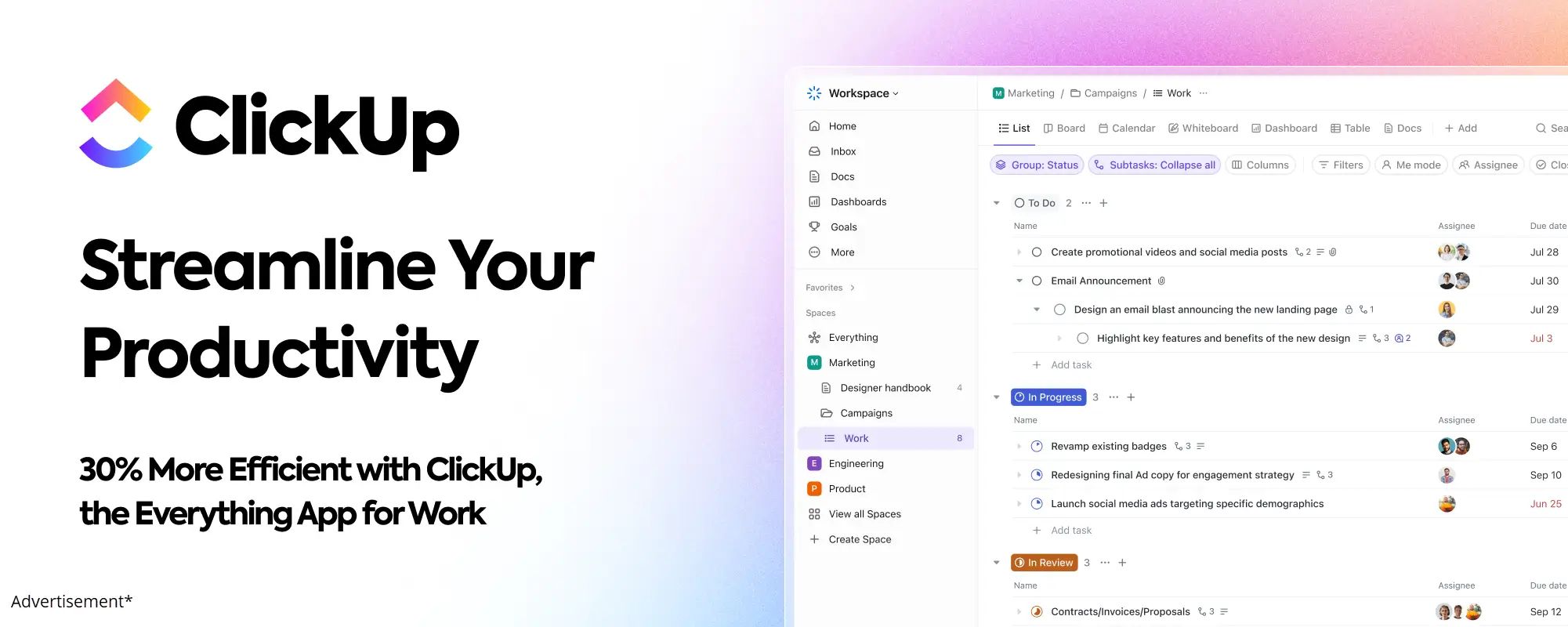
It makes your work more efficient. This saves time and cuts down on mistakes.
ClickUp works well for anyone, from solo entrepreneurs to big teams.
Key Takeaways
- Streamline your workflow with ClickUp's customizable workflows.
- Improve team productivity and organization.
- Simplify complex processes and reduce errors.
- Enhance collaboration and task management.
- Boost efficiency and save time.
Understanding ClickUp Workflows
Let's dive into how ClickUp workflows can make your work easier and faster.
ClickUp workflows help manage tasks by automating them. They also make teamwork better.
What is a Workflow in ClickUp?
A workflow in ClickUp is a set of tasks that work together to save time.
It's like a recipe for your tasks.
You set up the tasks and steps, and ClickUp does the rest.
This way, teams can focus on important tasks. ClickUp takes care of the routine ones.
You can make a workflow that automatically assigns tasks. This happens when a task reaches a certain stage or when it's due soon. This saves time and cuts down on mistakes.
Key Components of ClickUp Workflows
To get the most out of ClickUp workflows, you need to know the main parts. Here are the key elements:
- Tasks and Processes: Tasks are individual actions. Processes are a series of tasks that aim to achieve a goal.
- Triggers and Actions: Triggers start a workflow, like when a new task is created. Actions are what happens next, like a task being updated.
- Automation: ClickUp's automation lets you set up triggers and actions. This makes your workflow smooth and reduces manual work.
- Custom Fields and Statuses: Custom fields track specific data for tasks. Custom statuses show the stages a task goes through.
Knowing these parts helps you make advanced workflows. These workflows automate tasks and give insights into your project's status.

For example, you can track task priority with custom fields. Then, use this info to assign tasks based on team members' workloads.
Learn about ClickUp views to better understand how to visualize and manage your projects.
Custom statuses also help see how tasks move through different stages.
Benefits of Using Advanced Workflows
Advanced workflows make your team work better together.
They help you automate tasks and make things more efficient. This means you can do more in less time.
Increased Efficiency and Productivity
Increased Efficiency and Productivity are big wins. Automating tasks saves time for creative work. For example, setting up task assignments and due dates cuts down on mistakes.
ClickUp's automation is a top ClickUp productivity hack. Considering the numerous benefits, understanding ClickUp's pricing plans provides a solid foundation for optimizing your subscription based on your specific requirements.
It keeps tasks on schedule and lets your team focus on important work.
Enhanced Collaboration Among Teams
Enhanced Collaboration Among Teams is another big plus.
ClickUp's workflows help teams talk and work better together. Features like task dependencies and custom statuses keep everyone on the same page.
Advanced workflows also help with ClickUp process optimization. You can always make your workflows better and more efficient.
- Automate routine tasks to free up time for strategic work.
- Use task dependencies to coordinate team efforts.
- Implement custom statuses to track project progress.
Getting Started with Advanced Workflows
Starting advanced workflows in ClickUp is the first step to better project management. First, set up your ClickUp account. Then, decide what you want to achieve with your workflows.
Setting Up Your ClickUp Account
To start, create a ClickUp account if you haven't already. The sign-up is easy. After signing in, get to know the dashboard.
ClickUp has many templates to help you, including for workflow management.
- Sign up for ClickUp and explore the dashboard.
- Choose a template that fits your workflow needs or start from scratch.
- Customize your workflow by adding tasks, assigning team members, and setting deadlines.
Defining Your Workflow Objectives
Before you start setting things up, think about what you want to achieve.
Ask yourself: What are my goals? What can I make easier or faster?
ClickUp's Advanced ClickUp Workflows are flexible. Learning about setting up ClickUp will help customize the platform to your specific business needs, enhancing your efficiency and productivity.
Knowing your goals helps you make them work for you.
- Identify the key processes you want to manage or automate.
- Determine the metrics that will measure the success of your workflows.
- Consider using ClickUp's workflow templates as a starting point.
By following these steps, you'll be on your way to better workflows in ClickUp. Remember, keeping your workflows up to date is key.
Key Features for Advanced Workflows
ClickUp has special features to help you work better. These make it easy to handle big tasks and projects.
Automations in ClickUp
ClickUp is great at automating tasks. ClickUp automation lets you do things automatically. This saves you time.
For example, you can set up ClickUp to give tasks to team members. It can also change task statuses or send messages when needed.
Let's say you work with a content team. You can make ClickUp automatically give new tasks to writers. This keeps your work flowing smoothly.
Here's how task automation in ClickUp helps:
- It saves time by doing routine tasks for you.
- It cuts down on mistakes by not needing you to do everything.
- It makes your team work better by getting tasks done on time.
Custom Fields and Statuses
ClickUp lets you make custom fields for your projects. You can track progress, sort tasks, or set priorities. Custom fields help you manage your work well.
You can also make custom statuses for your tasks or projects. For example, in marketing, you might have statuses like "Concept," "In Design," "Review," and "Published."
Custom statuses help your team see where each task is. This makes teamwork and making decisions easier.
Task Dependencies and Relationships
Knowing about task dependencies is key for big projects.
ClickUp lets you set up task dependencies. This makes sure tasks are done in the right order.
ClickUp also lets you link tasks together.
Diving deeper, you may find it beneficial to view the ClickUp task project management process for seamless execution.
This makes it clear how tasks are connected. It helps in planning and doing projects better.
Using automations, custom fields and statuses, and task dependencies and relationships in ClickUp makes your team work better. It helps with managing projects and tasks.
Designing Your First Advanced Workflow
Get ready to boost your productivity with your first advanced workflow in ClickUp! You'll need to map out your workflow and use ClickApps for customization.
Mapping Out Your Workflow Process
Before you start, map out your workflow. Think of it like planning a road trip. You need to know where you're going and the best route.
- Identify the tasks involved in your workflow
- Determine the order of these tasks
- Decide on the people or teams responsible for each task
- Establish the criteria for moving from one task to the next
This will give you a clear picture of your workflow. ClickUp's workflow management capabilities will help you set it up.
Utilizing ClickApps for Customization
ClickApps are key to making your workflow your own. They let you customize your workflow to fit your needs. Here's how you can use them:
- Enable the Automation ClickApp to automate tasks
- Use the Custom Fields ClickApp to add details to tasks
- Activate the Dependencies ClickApp to ensure tasks are done in order
By using these ClickApps, you can optimize your ClickUp process. Remember, customization and automation are key to a successful workflow.

Integrating ClickUp with Other Tools
ClickUp shines when you link it with your favorite tools and apps. This connection automates tasks, makes workflows smoother, and boosts productivity.
Popular Integrations with ClickUp
ClickUp has many integrations with well-known apps and services. Some top ones include:
- Google Drive and Google Calendar: Link your files and calendar events to ClickUp tasks.
- Slack and Microsoft Teams: Connect ClickUp with your team's chat platform for updates.
- Trello and Asana: Move your workflows to ClickUp from other tools.
- Zapier: Link ClickUp to over 1,000 apps with Zapier's automation.
How Integrations Enhance Workflow Efficiency
Integrating ClickUp with other tools boosts your workflow. Here's how:
- Automate repetitive tasks: Use integrations to automate tasks, cutting down on manual work and errors.
- Streamline workflows: Connect ClickUp to other tools for a smooth workflow, no need to switch apps.
- Enhance collaboration: Integrations help teams work better together, with updates and notifications in real-time.
By using ClickUp's integrations, you can tailor your workflow to fit your needs. Whether you want to automate tasks, improve teamwork, or make workflows smoother, ClickUp's integrations help.
Best Practices for ClickUp Workflows
Good ClickUp workflows take planning and effort. Teams need to follow best practices to work better and faster.
Regularly Reviewing and Optimizing Workflows
It's important to check and improve workflows often. ClickUp productivity hacks help manage tasks better.
Here are ways to make your workflows better:
- Find and fix slow spots.
- Make tasks simpler by cutting out extra steps.
- Use automations to do less manual work.
As ClickUp experts say, always keep improving to work more efficiently.
Training Your Team on ClickUp
Teaching your team how to use ClickUp is key. ClickUp workflow management gets easier when everyone knows how to use it.
Here are tips for training:
- Make detailed training materials.
- Hold training sessions often.
- Let team members try things out and learn by doing.
"The right training can turn ClickUp into a strong team helper." - ClickUp User Community
Troubleshooting Common Workflow Issues
Even the best ClickUp workflows can have problems. Finding and fixing these issues is key. We'll look at how to spot and solve common ClickUp workflow problems.
Recognizing Workflow Bottlenecks
A workflow bottleneck slows down or stops tasks. Finding these bottlenecks is vital for a smooth workflow. Here are signs of a bottleneck:
- Tasks are always delayed or stuck.
- Team members are too busy, leading to less work done.
- Tasks or projects are taking longer to finish.
To find bottlenecks, watch your workflow closely. ClickUp's tools help by showing task rates and team workloads. Fixing the weak link is key.
"The biggest risk is not taking any risk... In a world that's changing really quickly, the only strategy that is guaranteed to fail is not taking risks." - Mark Zuckerberg
Solutions for Common Problems
After finding a bottleneck, it's time to fix it. Here are solutions for common problems:
- Task Dependencies Not Configured Correctly: Check and fix task dependencies for the right order.
- Insufficient Resource Allocation: Give more resources or change task assignments to help overworked team members.
- Inefficient Processes: Make your workflow better by removing unnecessary steps or automating tasks with ClickUp's tools.
Fixing these issues can make your ClickUp workflows much better. Keep watching and improving your workflow to stay efficient. ClickUp's new features for better workflows are very important.
Using ClickUp's custom fields and statuses can make your workflow fit your needs. This makes tracking progress and finding ways to get better easier.
With ClickUp's automation, you can make a workflow that adapts to project changes.

Case Studies: Successful ClickUp Workflows
Let's look at real businesses that got ClickUp workflows right. They saw big boosts in work speed, team work, and getting things done.
Examples from Different Industries
ClickUp workflows work well in many fields. Here are a few:
- Marketing Agency: A marketing team used ClickUp to make their work flow better. They set up a system that helped assign tasks, track progress, and talk to each other.
- Software Development Company: A software team used ClickUp to manage their work. They made a system with special fields, task links, and automations to help them work better.
- E-commerce Business: An online shop used ClickUp to make their order process better. They set up a system that worked with their tools, assigned orders, and kept track of shipping.
Key Takeaways from Each Example
What can we learn from these examples? Here are some important points:
- Automation is key: Making tasks automatic can make work faster and cut down on mistakes.
- Customization is critical: Making ClickUp fit your business needs can make teams work better together.
- Integration is vital: Working ClickUp with other tools can make workflows smoother and help the business run better.
Looking at these examples, we see that good ClickUp workflows mix automation, customization, and integration. Using these ideas, businesses can see big improvements and better manage their work.
For example, the marketing team's productivity went up by 30% with ClickUp. The software team cut their project times by 25%. These stories show how ClickUp workflows can help businesses succeed.
Advanced Tips for ClickUp Mastery
ClickUp mastery is within your reach. Learn to use templates and dashboards for better workflow management. These advanced features boost your productivity and make workflow processes smoother.
Leveraging Templates for Quick Setup
ClickUp has many workflow templates to help you start projects fast. To further enhance your understanding, consider reading about Introduction to ClickUp for comprehensive insights and knowledge.
These templates can be changed to fit your needs. Here's how to start with templates:
- Navigate to the ClickUp template gallery.
- Browse through the available templates and select one that fits your project needs.
- Customize the template by adding or removing tasks, changing due dates, and adjusting task assignments.
Using templates saves time and ensures all tasks are included. This keeps your productivity high.
Utilizing Dashboards for Workflow Tracking
Dashboards in ClickUp give you a visual overview of your workflows. They help you track progress, find bottlenecks, and make smart decisions. To get the most from dashboards:
- Create customized dashboards for different workflow aspects.
- Use widgets to show important metrics and task statuses.
- Regularly check your dashboards to keep up with your workflow's performance.
By using ClickUp productivity hacks like templates and dashboards, you can improve your workflow management. This leads to better efficiency.
The Future of Workflows in ClickUp
Workflow management is changing fast, and ClickUp is leading the way. It's clear that ClickUp will keep shaping how businesses work.
ClickUp is more than a tool; it's a partner in your business's growth. Everyone wants to know: what's next for ClickUp workflows?
Upcoming Features and Updates
ClickUp is always getting better, with new features and updates. Soon, it will have even better automation and AI in workflow management.
ClickUp automation will get stronger, making workflows easier. You'll be able to automate tasks and focus on growing your business.
- Enhanced automation capabilities
- Deeper AI integration for predictive workflow management
- Improved user interface for a more seamless experience
How ClickUp Adapts to User Needs
ClickUp is great at meeting user needs. It's very customizable, fitting the needs of all users. Whether you're small or big, ClickUp can be tailored for you.
ClickUp listens to its users and gets better because of it. As you enhance team collaboration, you should explore ClickUp's collaboration features to streamline communication and task management effectively.
This user-centric approach keeps ClickUp ahead in workflow management.
Looking ahead, it's exciting to see how ClickUp workflow management will grow. With its strong start and focus on innovation, ClickUp will keep leading the way.
Conclusion: Unlocking the Full ClickUp
You now know how to make ClickUp work better for you. You've learned to use its tools to make your work easier and faster. This helps your team work better together.
We talked about what makes ClickUp workflows great.
We also shared tips on how to use them well.
With ClickUp, you can make tasks automatic, change your workflows, and connect with other tools to work smarter.
Putting it all into Action
When you start using Advanced ClickUp Workflows, check them often.
This way, you can make sure they keep working well for you.
This will help you get the most out of ClickUp and manage your work better.
Now, you're ready to handle big projects and help your team succeed.
Start using ClickUp today and see how it can make your work easier and more efficient!

Address
c/o Postflex #586
Emsdettener Straße 10
48268 Greven
Germany

If you click on them and make a purchase, I may receive a small commission.
The price remains exactly the same for you. Thank you for your support!